


How to watch BBC iPlayer in Belgium with a VPN


If you’ve settled in Belgium and tried to catch up on a BBC drama or the news, you’ll know that sinking feeling when the screen tells you BBC iPlayer is not available in your location. It is genuinely frustrating, especially when you pay a UK TV licence or simply miss the programmes you grew up watching. BBC iPlayer is UK-only and blocks access from Belgium due to strict licensing and regional restrictions. The good news? There is a reliable, straightforward way back in, and this guide walks you through every step clearly.
Table of Contents
Key Takeaways
Point | Details |
Geo-blocking explained | BBC iPlayer blocks viewers in Belgium due to licensing agreements, but streaming is possible with a VPN. |
Step-by-step VPN access | Connecting to a UK VPN server allows you to use BBC iPlayer as if you’re in the UK. |
Troubleshooting common issues | Switch servers, clear cookies, and check for leaks to resolve typical VPN roadblocks. |
Alternatives and legal tips | SmartDNS and satellite TV offer options if VPNs fail, but always consider terms and compliance. |
Flexible solutions for expats | BBC iPlayer access may need periodic tweaks—stay flexible with backup plans for best results. |
Why is BBC iPlayer blocked in Belgium?
BBC iPlayer uses a system called geo-blocking to restrict its content to viewers physically located in the United Kingdom. Geo-blocking works by reading your IP address, which is a unique number assigned to your internet connection by your Belgian provider, and then comparing that address against a database of known locations. If your IP address falls outside the UK, iPlayer simply refuses to load the content you want.
The root cause is licensing. When the BBC acquires the rights to broadcast a film, a sports event, or a drama series, those rights are often sold on a territory-by-territory basis. Showing that content to viewers in Belgium without the correct licence could expose the BBC to significant legal liability. So the block is not personal; it is a contractual obligation baked into how rights are sold across Europe.
“Regional rights are at the core of how iPlayer operates. Without a UK IP address, the platform cannot verify you are entitled to view licenced content, so access is denied regardless of your account status.”
When you hit that block in Belgium, you typically see an error message saying something like “BBC iPlayer only works in the UK.” This is not a fault with your device or your internet connection. It is iPlayer’s detection system doing exactly what it was designed to do. You can read about legal options for UK TV that go beyond streaming as well.
Common triggers that set off the geo-block include:
Your IP address being registered to a Belgian internet provider
Browser cookies that store your previous location data
Device location settings using GPS or Wi-Fi triangulation
Payment region on linked accounts revealing a non-UK billing address
DNS settings (DNS stands for Domain Name System, the internet’s address book) pointing to Belgian servers
Independent testing by Gizmodo’s VPN reviewers confirms that IP detection is the primary method iPlayer uses, but the platform cross-references multiple signals to catch workarounds. Understanding this is important because it explains why a quick IP change alone is sometimes not enough. You can also explore UK TV streaming apps as a complement to iPlayer for broader British content access.
Now that you know the basics of geo-blocking, let’s move on to what you need to get access again.
What you need before you start: Essential requirements
Before you touch any settings or download any software, gather everything on the checklist below. Missing one item is the most common reason expats get halfway through setup and then hit a wall. Think of this as your shopping list before a recipe; get the ingredients right and the cooking becomes easy.
Item required | Details |
BBC iPlayer account | Free to create; a UK postcode is needed for registration |
Compatible device | Laptop, smartphone, tablet, or Smart TV |
Reliable VPN | A VPN (Virtual Private Network) with active UK servers |
Fast internet connection | Minimum 5 Mbps for HD; 25 Mbps recommended for 4K |
VPN app installed | Desktop app, mobile app, or browser extension |
Up-to-date browser or app | Latest version of Chrome, Firefox, or the iPlayer app |
A VPN, to put it simply, is a service that routes your internet traffic through a server in another country, giving you that country’s IP address. When you connect through a UK VPN server, websites like iPlayer see a UK IP address and treat you as a UK viewer. It is the digital equivalent of borrowing a friend’s UK address. Connecting to a UK server and then opening BBC iPlayer whilst logged in is the core method that consistently works for expats.
Devices that perform best for this setup include:
Windows and Mac laptops — easiest to configure, with dedicated VPN apps
Android and iOS smartphones — VPN apps are available on both platforms
iPad and Android tablets — good for casual viewing around the home
Amazon Fire TV Stick — supports VPN apps with a side-load if needed
Apple TV and Chromecast — require router-level VPN configuration for best results
For account registration, you will need a UK postcode. Any valid UK postcode works, such as W1A 1AA for central London. iPlayer does not verify that you physically live at that address; it simply requires one to complete registration. If you have a family member or friend in the UK, use their postcode for the most seamless experience. You can also find TV multiscreen setup tips if you plan to stream on more than one screen at home.
Pro Tip: Register your BBC iPlayer account in advance of your VPN setup, using a valid UK postcode. Trying to register and configure a VPN simultaneously is a frustrating guessing game when something goes wrong; you will not know which step caused the problem.
With all your essentials ready, you’re set to move onto the main event: actually unblocking and streaming BBC iPlayer in Belgium.
How to use a VPN to access BBC iPlayer in Belgium: Step-by-step
This is the part most guides rush through. We will not. Each step below is written so that even if you have never used a VPN before, you can follow it without confusion.
Choose and sign up for a reputable VPN service. Select a paid VPN that explicitly lists BBC iPlayer as a supported service. Free VPNs almost always fail because their IP addresses are quickly identified and blocked by iPlayer.
Download and install the VPN app on your chosen device. Most providers offer apps for Windows, Mac, iOS, and Android. Install from the official VPN provider’s website or your device’s app store.
Open the VPN app and log in using the credentials you created during sign-up.
Select a UK server location. Look for server options labelled “United Kingdom,” “London,” or “Manchester.” Connect to it. Wait until the app confirms you are connected.
Open your browser or the BBC iPlayer app. Do not open iPlayer before connecting to the VPN. Sequence matters here.
Go to bbc.co.uk/iplayer or open the iPlayer app. Log into your BBC account.
Choose your programme and press play. If it loads without an error, you are successfully watching BBC iPlayer from Belgium.
Connecting via a UK server first before launching iPlayer is the key sequence that most first-time users miss.
Here is how some of the most-tested VPN options compare for iPlayer access:
VPN provider | Reliability for iPlayer | Speed | Monthly cost (approx.) | Ease of use |
ExpressVPN | Very high | Excellent | €10-12 | Very easy |
NordVPN | High | Very good | €4-8 | Easy |
Surfshark | High | Good | €3-5 | Easy |
CyberGhost | Moderate | Good | €2-4 | Very easy |
ProtonVPN (free tier) | Low | Fair | Free | Moderate |
Pro Tip: If playback fails after following all the steps, clear your browser cookies and cache before retrying. Cookies can store your Belgian location data even after your IP has changed. After clearing cookies, reconnect your VPN and reload iPlayer fresh. If it still fails, try a different UK server within the same VPN app; London, Manchester, and Edinburgh servers often behave differently from one another.
Even with the right steps, technical hiccups happen. Here’s how to troubleshoot and optimise your access.
Troubleshooting and alternatives when VPN fails
You have followed every step, and iPlayer is still showing an error. This is more common than you might think, and it does not mean the method does not work. It means iPlayer’s detection system has flagged your connection. Here is what is likely happening and how to fix it.
Common reasons your VPN might not be working include:
The VPN’s IP address has been blacklisted by BBC iPlayer since the provider last updated its server pool
DNS leaks (when your device’s DNS requests bypass the VPN and reveal your real Belgian location)
IPv6 leaks (IPv6 is a newer internet address format; many VPNs only mask IPv4 addresses by default)
WebRTC leaks (WebRTC is a browser technology that can expose your real IP address even through a VPN)
Residual cookies in your browser from a previous non-VPN session
Device location services still active and transmitting your GPS position
“BBC iPlayer actively detects VPN and proxy use and can block access depending on the VPN IP’s reputation and multiple additional signal checks. This means the same VPN server that worked yesterday may not work today.”
To fix these issues methodically, work through the following troubleshooting steps. First, switch to a different UK server within your VPN app. Second, clear all cookies and cached data in your browser. Third, disable IPv6 in your device’s network settings if your VPN does not have an IPv6 leak protection feature built in. Fourth, use a browser extension like a WebRTC disabler if you are streaming via a browser rather than the iPlayer app. Fifth, turn off your device’s GPS or location services entirely while streaming.
These troubleshooting techniques covering cookies, DNS, IPv6, and WebRTC leaks are widely recommended by technical reviewers and represent the current best practice for persistent iPlayer access problems.
If VPN-based access continues to fail, there are a couple of alternatives worth knowing about. SmartDNS is a service that reroutes only the part of your traffic that reveals your location, without encrypting the rest. It can be faster than a VPN for streaming, but it provides no privacy protection and is less reliable as BBC iPlayer’s detection methods evolve. Specialist unblocking tools, sometimes marketed as “iPlayer unblockers,” can work in the short term but carry greater uncertainty and sometimes security risks; treat claims about them with caution.
For a genuinely reliable, long-term solution, many expats in Belgium combine a good VPN with a physical satellite TV setup. You can explore UK TV setup for expats or consider UK satellite TV options as a stable backup that does not depend on any IP trickery at all.
Fixing technical issues is one thing. Selecting the right approach for long-term stable access is another. Let’s compare your main options.
Comparing VPNs and alternative solutions: What really works for expats?
Not every solution suits every expat. Your choice depends on how often you watch, what devices you use, how comfortable you are with technical setup, and whether privacy matters to you. Here is a clear side-by-side comparison.
Solution | Ease of setup | Reliability | Privacy protection | Ongoing cost | Risk level |
Premium VPN | Easy | High (varies by provider) | Strong | €3-12/month | Low |
Free VPN | Easy | Very low | Weak | Free | Moderate |
SmartDNS | Moderate | Moderate | None | €3-5/month | Moderate |
Specialist unblocking tool | Easy | Variable | Uncertain | Varies | Higher |
Satellite TV (physical) | Requires installation | Very high | N/A | Low ongoing | Very low |
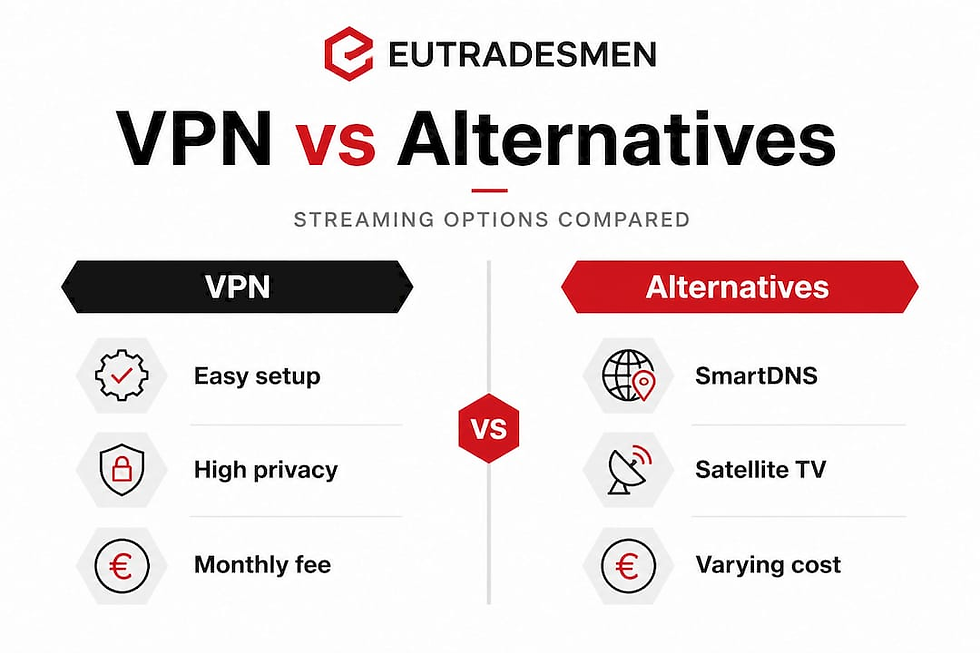
Real-world testing confirms that premium VPNs outperform free alternatives, but performance and access reliability shift as BBC updates its detection systems. This means no single VPN is permanently reliable; the landscape changes throughout the year.
Some guides suggest that SmartDNS or specialist unblocker tools can serve as solid alternatives when VPNs fail, but these claims deserve careful scrutiny. Independent, testing-focused sources consistently find these tools less dependable over time, and some carry data privacy concerns that premium VPNs do not.
Key considerations for expats specifically:
Convenience: A premium VPN with a dedicated iPlayer server toggle is the least effort for daily streaming
Ongoing cost: Budget around €5 to €10 per month for a reliable service; this is the realistic price of consistent access
Privacy: If you use a VPN for banking or work as well as streaming, choose one with a verified no-logs policy
Flexibility: Having a satellite TV alternative means that when your VPN hits a bad patch, you are not completely without British telly
Our practical recommendation is this: start with a premium VPN. If you find yourself switching servers more than once a week and it is disrupting your viewing, consider adding a satellite TV setup as a reliable complement rather than a replacement.
Having now seen the strengths and weaknesses of each approach, it’s time to offer some hard-won perspective rarely found in standard guides.
What most guides miss: The expat reality of BBC iPlayer access in Belgium
Most articles on this topic paint an overly optimistic picture. They make it sound like you install a VPN, click a button, and enjoy seamless BBC viewing forever. That is not the reality we hear from English-speaking expats across Brussels, Waterloo, Tervuren, and Leuven.
The honest truth is that VPN access to iPlayer for expats in Belgium works reliably some of the time and unpredictably at others. BBC’s VPN detection is dynamic, meaning it is always being updated. IP addresses that worked perfectly last month may be blocked this month. You will need to rotate UK server endpoints and occasionally fix browser or device inconsistencies around DNS, IPv6, and cookies. Expect this. Build it into your routine rather than treating every interruption as a crisis.
“The BBC’s detection capabilities evolve continuously. Flexibility and a willingness to adapt your approach, rather than chasing a perfect permanent solution, is what keeps British expats watching over the long term.”
There is also a grey zone worth acknowledging honestly. Using a VPN to access iPlayer from Belgium may technically breach BBC iPlayer’s terms of service. There are no criminal penalties for private use, but your account could theoretically be restricted. Most expats weigh this risk as low and accept it. That is a personal decision, and we are not here to tell you what to do; we simply believe you deserve the full picture rather than a guide that glosses over it.
Our practical advice for long-term access is straightforward. Maintain a premium VPN subscription and learn which UK server locations work best for you. Keep a second UK server location bookmarked as a backup. Clear your browser cookies weekly if you stream regularly. And seriously consider a physical satellite TV setup as your reliable fallback when streaming becomes a frustrating guessing game. You can explore satellite TV as a top choice for expats in Belgium in 2026 for an in-depth look at that option.
The expats who stay happiest with their British TV setup are not those who found one magic solution. They are the ones who built a small toolkit and do not panic when one method hiccups.
Need help at home in Belgium?
Getting BBC iPlayer working smoothly is just one piece of the expat life puzzle. Whether you need a satellite dish installed so you never miss a signal, a reliable Wi-Fi setup that reaches every room for uninterrupted streaming, or any other home service, we understand the unique challenges of settling into Belgium without fluent French or Dutch.
At Eutradesmen, our team of English-speaking professionals covers everything from handyman services and repairs to full plumbing solutions and gardening and landscaping. We work across Brussels, Waterloo, Tervuren, Leuven, Mons, and Antwerp, and every job is handled in plain English with transparent pricing. No language barriers, no frustrating guessing games. Just reliable, friendly service from people who know what expat life in Belgium actually looks like. Get in touch today and let us take one more thing off your plate.
Frequently asked questions
Is it legal to use a VPN for BBC iPlayer in Belgium?
Using a VPN to stream BBC iPlayer may breach their terms of service and could have copyright implications; there are no criminal penalties for private use, but BBC iPlayer’s terms restrict access from outside the UK and your account could be restricted if flagged.
Why is my VPN not working with BBC iPlayer?
BBC iPlayer actively detects and blocks known VPN IP addresses; try switching to a different UK server, clearing your browser cookies, and checking for DNS, IPv6, or WebRTC leaks that may be revealing your real location.
What devices work best for streaming BBC iPlayer with a VPN?
Laptops, tablets, and smartphones running mainstream operating systems are the easiest to set up, particularly with a dedicated VPN app installed; some Smart TVs can work but may require additional configuration at the router level.
Are SmartDNS services a better alternative to VPNs for BBC iPlayer?
SmartDNS can work for some users but is generally less reliable than premium VPNs; independent guides caution that alternative unblocking tools and SmartDNS services are more vulnerable to BBC iPlayer’s regularly updated blocking methods.
How often do I need to switch VPN servers to keep BBC iPlayer working?
You may need to switch servers whenever a stream is blocked, as VPN detection is dynamic and working IP addresses change frequently in response to BBC iPlayer’s ongoing updates to its geo-blocking system.
Contact Eutradesmen:
WhatsApp: +32 466 900 281 Telephone: +32 2 808 70 31 Email: info@eutradesmen.com
Follow us everywhere:
Instagram → https://www.instagram.com/eutrsdesmen/ Facebook → https://www.facebook.com/eutradesmen/ Threads → https://www.threads.com/@eutrsdesmen Bluesky → https://bsky.app/profile/eutradesmen.bsky.social TikTok → https://www.tiktok.com/@eutradesmenbelgium Pinterest → https://www.pinterest.com/eutradesmen/ Google Maps → https://maps.app.goo.gl/zjmYyCV1uADPj7QP6 YouTube → https://www.youtube.com/@Eutradesmen LinkedIn → https://www.linkedin.com/in/eutradesmen-belgium X - Twitter → https://x.com/eutradesmen
#BBCiPlayerBelgium #VPNBelgium #WatchBBCAbroad #ExpatsInBelgium #BritishExpats #BBCiPlayerVPN #UKTVBelgium #ExpatsInBrussels #EnglishSpeakingBelgium #WaterlooBelgium #TervurenExpats #LeuvenExpats #BrusselsExpats #UKTVAbroad #StreamingBelgium #BBCiPlayer2026 #VPNForStreaming #EnglishTVBelgium #BritishInBelgium #Eutradesmen #IxellesExpats #UccleLiving #SchaerbeekExpats #AntwerpExpats #MonsExpats
Recommended


Comments